A robust network-debugging companion
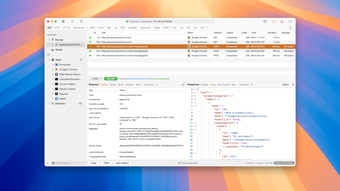
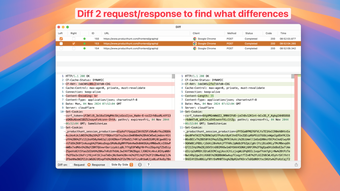
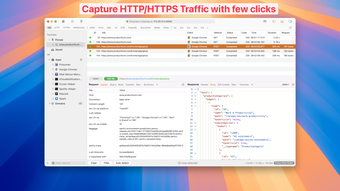
Proxyman is a powerful network debugging tool for macOS, specifically designed to capture and analyze HTTP(S) requests. With just a few clicks, you can capture, decrypt, and mock requests for detailed insight. Its basic features enhance workflow efficiency by allowing users to pin important domains and filter out unnecessary traffic. Additionally, its customizable layout helps users focus on critical tasks without distraction.
For more complex debugging concerns, the program offers a comprehensive suite of tools, including the Scripting, Breakpoint, GraphQL, and Map Local tools—ideal for backend developers. Proxyman serves as a powerful ally for anyone aiming to master HTTP(S) traffic management efficiently.
Effortless unlocking of network insights
When tackling network issues, having a robust tool like Proxyman is valuable. One of its significant features is its SSL Proxying—serving as an intermediary to intercept SSL traffic between applications and web servers. The practical benefit is unveiling HTTP/HTTPS requests and responses in clear text to simplify network analysis. With seamless setup on macOS, inspecting encrypted data becomes a streamlined process—enhancing your debugging efficiency significantly.
For targeted debugging, the tool includes a refined filtering system. This feature allows developers to narrow their exploration by combining different filter criteria, such as Protocol, Content-Type, and URL. The benefit of such focused inspections is the swift identification of specific issues in complex environments, saving time otherwise lost in endless logs. By efficiently tracking down data, users can accelerate their diagnostic process—arriving at solutions quicker and with greater confidence.
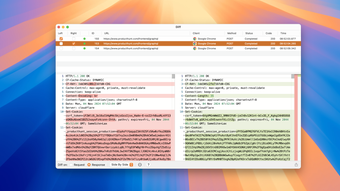
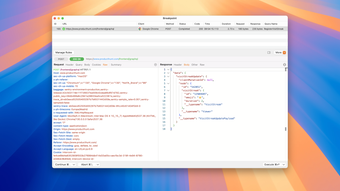
The software's advanced debugging features, such as the Scripting and Breakpoint tools, offer powerful customization and flexibility for developers. The Scripting Tool allows the coding of JavaScript to alter request/response logic, making debugging exponentially faster with built-in code snippets and libraries. Moreover, the Breakpoint Tool gives developers the advantage of modifying data dynamically, ensuring that no client-side code adjustments are necessary. Combined with GraphQL compatibility and the Map Local Tool, the software streamlines the process of testing with local files, significantly speeding up development cycles.
Simplified configuration for backend developers
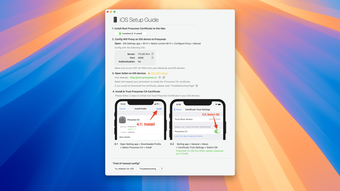
Proxyman offers a seamless, user-friendly setup process for backend developers. The software eliminates unnecessary configurations and is known for its compatibility with popular network libraries like NodeJS, Ruby, and Python. The process starts by opening the Automatic Setup Window, where users can initiate the setup in just a few clicks. This intuitive interface allows developers to swiftly inspect HTTP(S) traffic from various libraries—improving debugging efficiency without a steep learning curve.
The next step is to open a pre-configured Apple Terminal App. This terminal will automatically configure HTTP Proxy and trust the software's self-signed certificate specifically for the current Terminal session—leaving the rest of the system unaffected. Once the setup is complete, watch as the tool captures HTTP(S) traffic the moment you start your server or execute scripts. This feature provides instant feedback, helping developers diagnose issues in real-time.
However, it's important to note a key limitation of the program: while it excels in handling traditional network environments, it encounters challenges with VPN applications. When using a VPN, traffic intended for the Proxyman local server is rerouted through VPN servers—which hinders traffic capture. Despite this limitation, the software remains an invaluable tool, enabling developers to freely debug and optimize their backend landscapes more effectively.
A handy tool for developers
With Proxyman, web debugging becomes a smoother and more intuitive process for developers at any skill level. Its ability to handle complex tasks effortlessly reflects its thoughtful design focused on user efficiency. As a tool compatible with popular network libraries, it's a practical and versatile asset in any developer's toolkit. Whether you're a seasoned programmer or just starting, it simplifies the world of HTTP(S) requests for everyone.